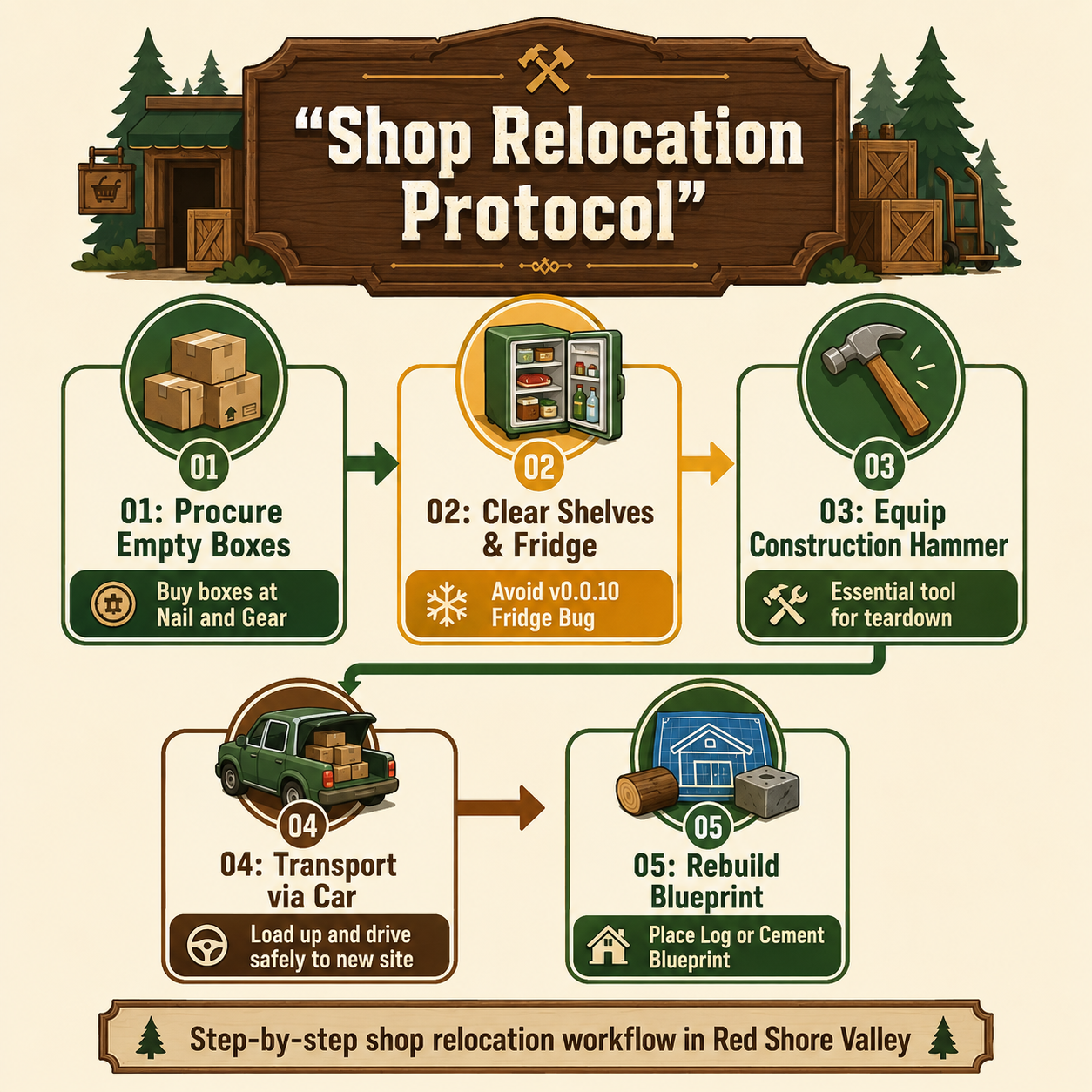
To answer the immediate question: you must first empty all shelves and refrigerators into boxes, equip your construction hammer to dismantle the current structure, and place a new blueprint via the build menu. If you are expanding your footprint in Red Shore Valley, figuring out exactly how to move shop Campsite Hustle is a mandatory rite of passage for any serious manager. The Early Access launch by Red Shore Games threw players into the deep end of campground management, and relocating your primary retail space is one of the most mechanically dense tasks in the game.
Moving your store isn't just a matter of clicking and dragging a building. It requires logistical planning, inventory management, and a solid understanding of the game's physics-based transport system. Furthermore, early adopters faced a slew of game-breaking bugs when attempting this exact maneuver—bugs that were thankfully addressed in the recent Playtest Hotfix (Build 23493432). This guide breaks down the optimal relocation strategy, ensuring your stock survives the transition and your new storefront opens without a hitch.
The Core Mechanics: How to Move Shop Campsite Hustle
Unlike casual management simulators that allow god-mode building manipulation, Campsite Hustle! - Management Simulator grounds its construction mechanics in physical labor. You cannot simply select your shop and drag it to a new grid square. The game requires you to manually dismantle the existing structure and rebuild it from scratch at the new location.
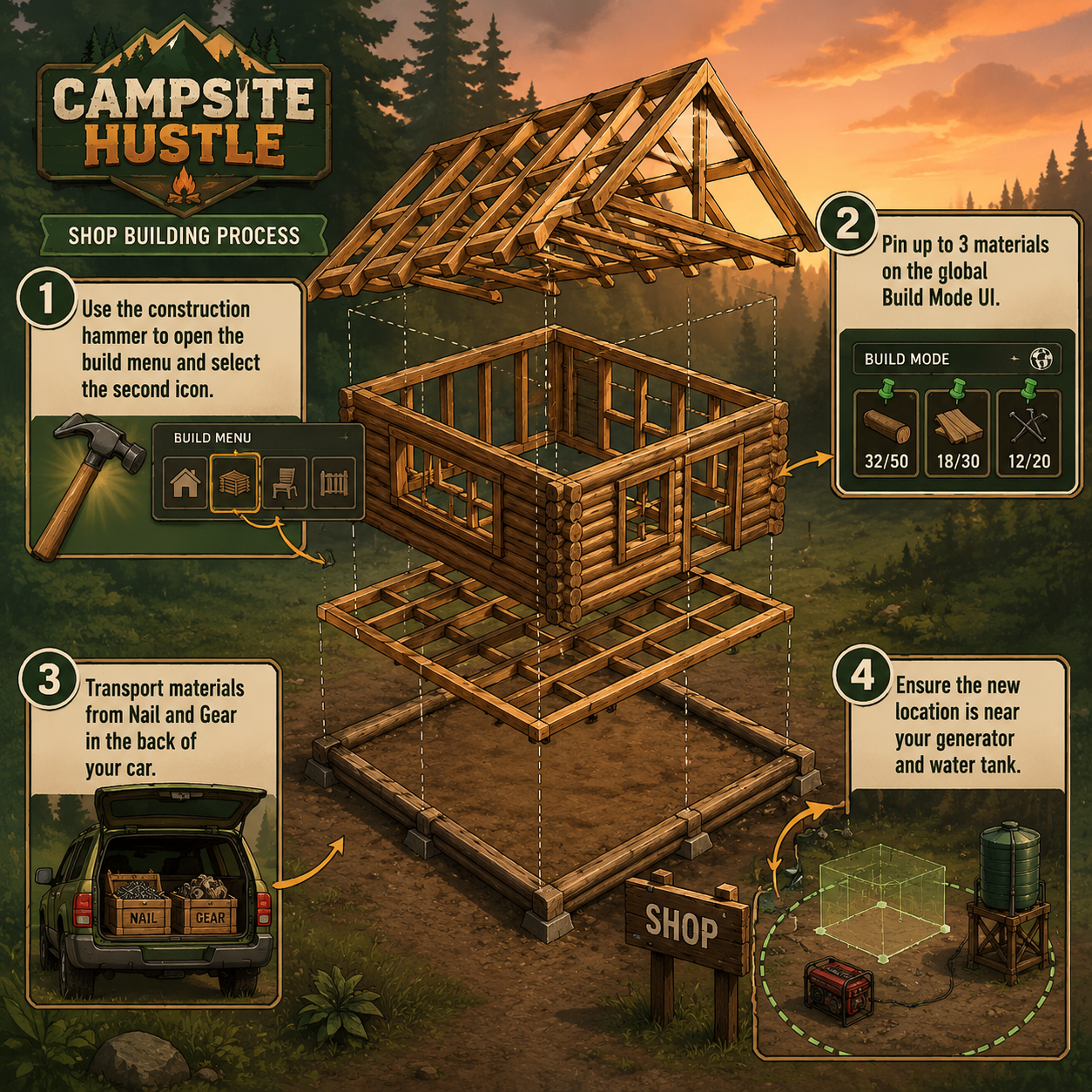
The primary tool for this job is the construction hammer, which you likely picked up off the table alongside the chainsaw and rock drill when Gloria first called you to prepare the area. Equipping the construction hammer and opening the build menu (the second icon in your UI) gives you access to the shop blueprints.
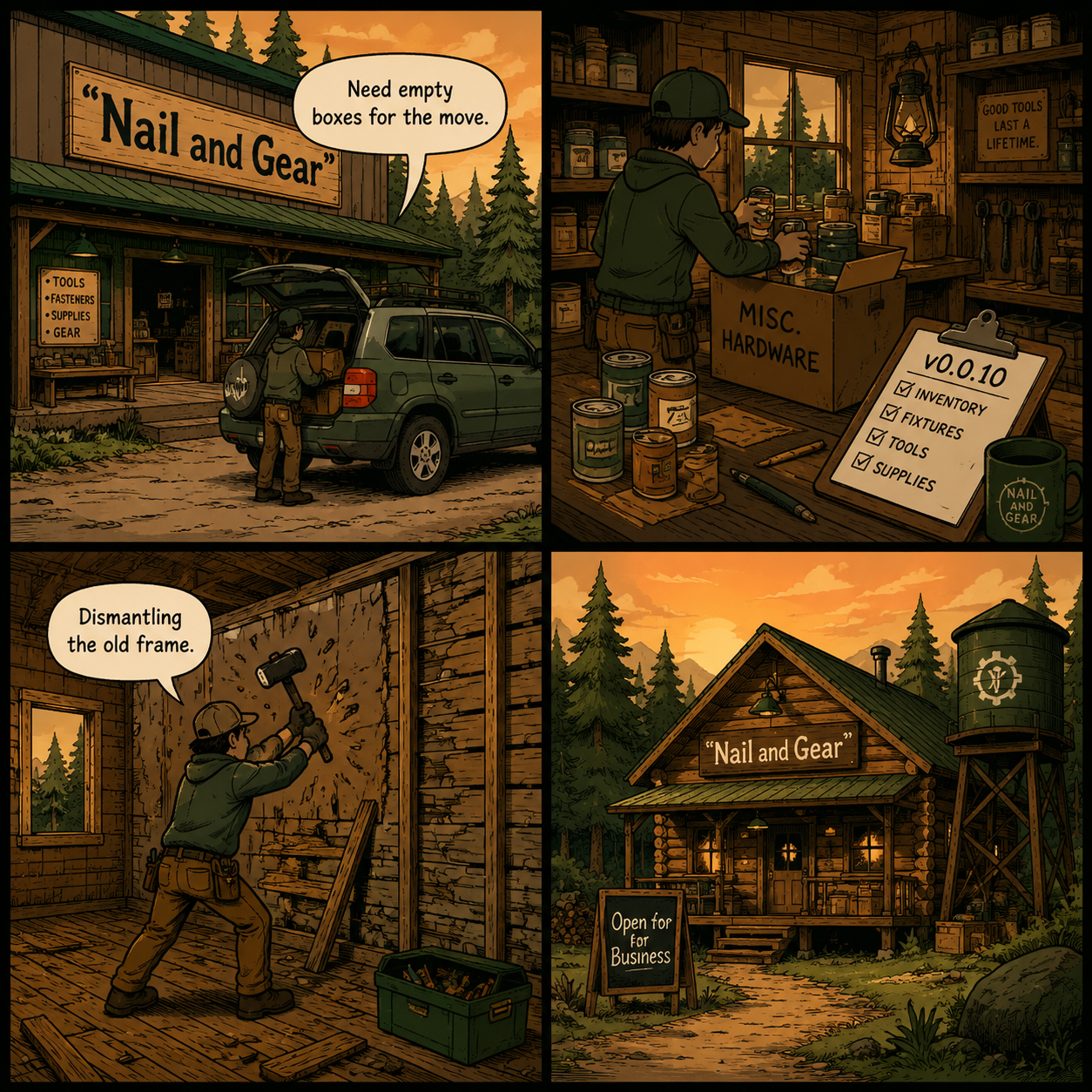
However, before you swing that hammer, you have to understand the material economy. When you dismantle a building, you do not get a 100% refund on the physical materials. You will need to make a trip into town to the Nail and Gear hardware store to purchase replacement materials for the new foundation. Because you are physically limited by the trunk space in your car, moving a shop is a multi-day operation. You must drive to Nail and Gear, load the cement or log materials into the back of your vehicle, and transport them back to your lot.
Choosing Your New Storefront
When you place the new blueprint, you have a choice between two primary architectural styles. Your decision here impacts how many trips to town you will need to make.
| Feature | Log Shop | Cement Shop |
|---|---|---|
| Aesthetic | Rustic, blends with Red Shore Valley pines | Modern, industrial and clean |
| Material Sourcing | High reliance on lumber (partially harvestable) | High reliance on concrete mix (store-bought) |
| Best Placement | Deep woods, near the pioneer cabins | Near the highway, adjacent to the gas station |
| Relocation Difficulty | Moderate (easier to source wood locally) | High (requires maximum trips to Nail and Gear) |
Preparing Your Inventory Before the Relocation
The most common mistake new managers make is dismantling their shop while products are still on the shelves. If you destroy the physical shelving units without boxing up your inventory, those items will clip through the floor, scatter across your lot, or despawn entirely, destroying your profit margins for the week.
Before initiating the move, you must execute a complete inventory lockdown. Drive to Nail and Gear and purchase a surplus of empty cardboard boxes. Bring them into your current shop and manually interact with every shelf, transferring the products from the display back into the boxes.
Once boxed, these items need to be temporarily stored. If you have already constructed a Tool Bench or a Firewood Shed (both of which received updated localization names in the v0.0.10 patch), you can use the adjacent clearings as a staging ground. Stack the boxes neatly. Do not leave them in the direct path of camper NPCs, as pathing collisions can occasionally send a box flying into the stratosphere.
Patch v0.0.10 Explained: How to Move Shop Campsite Hustle Safely
If you attempted to move your shop prior to May 31, 2026, you likely encountered a nightmare scenario. The v0.0.10-preview hotfix was deployed specifically to address the cascading failures associated with shop relocation. Understanding what was fixed is crucial, as it dictates what you no longer need to fear during the moving process.
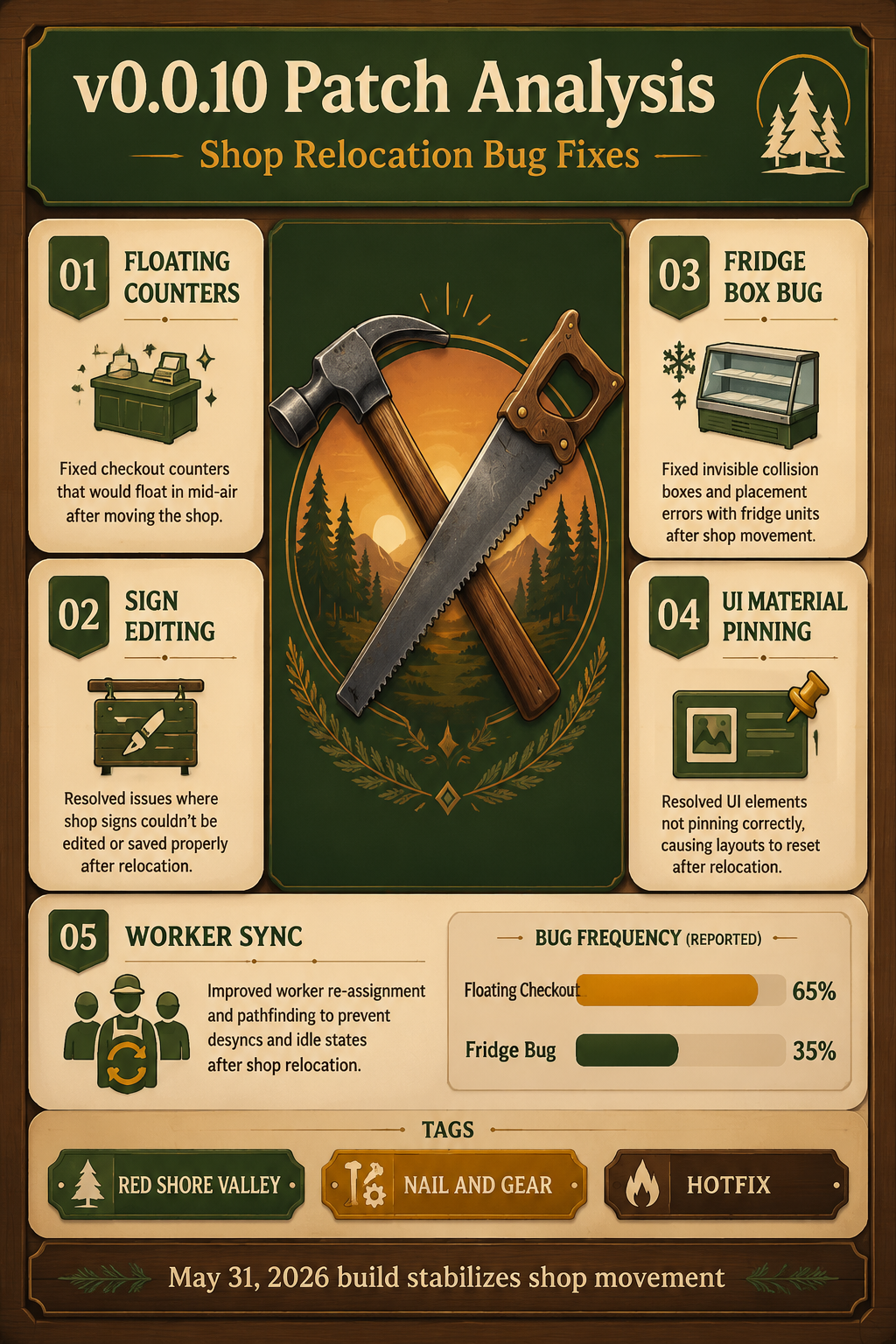
The most notorious issue was the "floating self-checkout" bug. Prior to the patch, dismantling the shop would successfully remove the walls and shelves, but the self-checkout counters would remain suspended in mid-air at the old location. Players could not interact with them, delete them, or build over them. The v0.0.10 patch completely resolves this; self-checkout counters now correctly despawn and transfer their data to the new blueprint.
Here is a breakdown of the critical shop-related fixes in Build 23493432:
- The Refrigerator Box Bug: Previously, players could not remove products from the refrigerator using an empty box, forcing them to move items one by one. The hitbox interaction has been repaired, allowing for rapid fridge clearing.
- Sign Transformation Errors: If you attempted to run multiple shops, the items displayed on your signs would distort. Sign states now initialize with the correct values regardless of how many retail buildings exist on your lot.
- Build Mode UI Conflicts: Editing a shop sign used to accidentally trigger Build Mode, causing players to inadvertently place or delete structures while trying to type. The UI layers have been strictly separated.
- Material Pinning: The global Build Mode UI now correctly shows pinned material requirements for the first 3 placed objects. Unpinning materials hides the UI, and repinning restores it perfectly, making it much easier to track what you need to buy at Nail and Gear.
Step-by-Step Execution: How to Move Shop Campsite Hustle Without Losing Stock
With the bugs patched and the mechanics understood, here is the exact, step-by-step workflow to execute a flawless relocation.
Step 1: Secure the Staging Area Clear a flat piece of land near your intended new location. Use the chainsaw to cut down any obstructing trees and the rock drill to shatter boulders. You want a clean line of sight from your car parking spot to the new building skeleton.
Step 2: Box the Inventory As detailed above, use empty boxes to strip your current store bare. Pay special attention to the refrigerators, taking advantage of the v0.0.10 fix to quickly box up perishables. Stack these boxes in your staging area.
Step 3: Dismantle the Old Structure Equip your construction hammer. Approach the walls of your old shop and hold the interaction key to dismantle. Ensure you have completely removed the floorboards, as leaving a single foundation piece will prevent the lot from registering as "cleared."
Step 4: Place the New Blueprint and Pin Materials Open the build menu (second icon), select either the cement or log shop, and place the blueprint at your new location. Immediately use the new v0.0.10 UI feature to "Pin Materials." This will put a checklist on your screen detailing exactly how much wood, cement, and metal you need.
Step 5: The Logistics Run Drive your car into town. Before hitting Nail and Gear, stop at the gas station. Park near the pump, grab the nozzle, and refill your vehicle from the circular point at the back of your car. While there, purchase four gas cans—you will need them to keep your generator and water tank running while you spend the next two in-game days building. Drive to the hardware store, buy the pinned materials, load them into your trunk, and drive back.
Step 6: Rebuild and Restock Carry the materials from your car to the marked spots near the building skeleton. Once the structure is complete, bring your boxes in from the staging area and restock the shelves.
Strategic Placement in Red Shore Valley
Where you choose to rebuild is just as important as how you execute the move. Your shop is the economic engine of your campsite. If it is too far from the main highway, drive-by customers will not stop. If it is too far from the campsites, your overnight guests will complain about the walking distance.
The optimal location for your relocated shop is at the intersection between the main dirt road entering your property and the path leading to your generator and water tank. This serves a dual purpose. First, it forces all arriving traffic to pass your storefront, increasing impulse buys. Second, it centralizes your daily maintenance. You have to refuel the generator and water tank daily using the gas cans you buy in town. Placing the shop near these utilities means you can unload retail stock and utility fuel from your car trunk in a single parking spot, drastically cutting down on wasted walking time.
Additionally, keep the shop away from the immediate spawn points of raccoons and trespassers. The deeper into the woods you build, the more likely you are to deal with disruptive saboteurs tampering with your outdoor retail displays.
Frequently Asked Questions (FAQ)
Do I lose my products if I dismantle the shop without boxing them? Yes. While the v0.0.10 patch fixed many inventory transfer issues, dismantling shelving units that actively hold loose products will cause those items to drop to the floor. If too many items drop, the game's physics engine will scatter them, and they may despawn. Always use empty boxes to clear shelves first.
Why is my self-checkout counter floating in mid-air? If you see a floating self-checkout counter, you are playing on an outdated version of the game (v0.0.9 or earlier). You must update Campsite Hustle! via Steam to Build 23493432 (the May 31, 2026 Playtest Hotfix). Once updated, the floating counters will correctly despawn.
Can I have multiple shops in Campsite Hustle? Yes, the game supports multiple retail buildings on a single lot. However, prior to v0.0.10, having multiple shops caused sign transformation errors. This has been resolved, so you can now safely run a log shop near the cabins and a cement shop near the highway simultaneously.
Where do I get more building materials for the new shop? You must purchase building materials at the Nail and Gear hardware store located in the main town. You cannot carry these by hand; you must place them in the back of your car and drive them to your campsite.
Why won't the game let me take items out of the refrigerator? This was a known bug where the empty box hitbox did not interact correctly with the refrigerator shelves. Ensure your game is updated to the v0.0.10 patch, which explicitly fixed product handling for refrigerators and storage units.
Sources
- Red Shore Games, Campsite Hustle! - Management Simulator (Early Access, June 2, 2026).
- SteamDB, Playtest Hotfix | v0.0.10-preview Patch Notes (Build 23493432, May 31, 2026).
- Community Gameplay Guides, Red Shore Valley Logistics & Material Pinning Mechanics.