Virtual Try-On
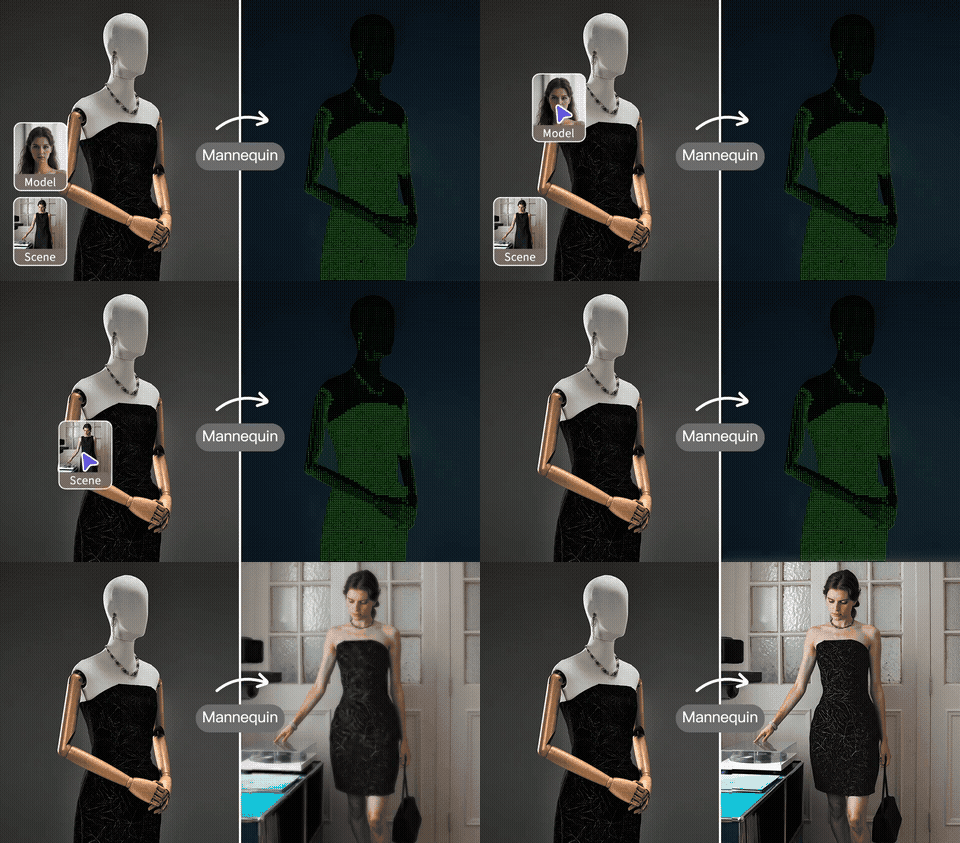
Try on clothes virtually with AI
Upload Product
Clothing, shoes, accessories
Upload Model
Full body or half body photo
Upload Environment
Optional: replace the background with your scene
Upload a product and a model photo to get started
History
Try on clothes virtually with AI
Sign in to start generating images
Virtual fashion fitting powered by AI
See how any clothing item looks on a person before purchasing. Our AI generates realistic try-on results in seconds.
Realistic Results
Our AI preserves the person's face, pose, and body proportions while naturally fitting the clothing onto them.
Lightning Fast
Get your virtual try-on results in seconds. Upload two photos and let AI do the rest — no manual editing needed.
Any Clothing Type
Works with shirts, dresses, pants, shoes, accessories, and more. Perfect for e-commerce and personal styling.
How to try on clothes virtually
Upload product photo
Upload a clear photo of the clothing item you want to try on. Works with any clothing, shoes, or accessories.
Upload model photo
Upload a photo of the person who will wear the item. Full body or half body photos work best.
Get your result
Our AI generates a realistic image of the person wearing the product. Download and share instantly.
Frequently Asked Questions
Answers to the most common questions about AI virtual try-on for fashion brands, photographers and shoppers.
What kinds of garments work best with virtual try-on?
Clean ghost-mannequin or flat-lay shots of tops, dresses, jackets, t-shirts, hoodies and most knitwear give the strongest results. The AI handles wrinkles, sleeves and necklines convincingly. Highly structured garments (corsets, suit jackets) and accessories (shoes, hats, jewellery) are partially supported — results vary with how much of the garment silhouette is visible in the source image.Do I need a model release if the model image isn't a real customer?
If you upload a stock model photo or a synthetic AI-generated person, no release is required. If you upload a photo of a real, identifiable person you must have their permission to use their likeness in derivative content — this is a creator responsibility, not something the tool can verify.Will the brand prints, logos and patterns transfer accurately?
Yes for most prints. Our model preserves graphic elements, logos and seasonal patterns when warping the garment to fit the model's pose. Very fine text under ~12 pt may soften slightly; if your hero product has critical small text we recommend a separate detail shot in the listing.Can I use try-on results in product listings on Shopify, Amazon or TikTok Shop?
Yes — you own commercial rights to the output. Many brands use our generations to A/B test product imagery, build out colour variants without re-shoots, and create lifestyle photos for international markets. Always check the marketplace's specific rules for AI-generated imagery before publishing.How is this different from using AI Model or Swap Model & BG?
Virtual Try-On dresses an existing model photo in your garment. AI Model generates a model from a flat-lay (no model photo needed). Swap Model & BG re-uses your existing on-model shot but changes the model's identity or the scene around them. Pick the tool that matches what you already have in hand.What's the maximum resolution and how long does it take?
Up to ~2048 px on the long edge, processed in 15–40 seconds per image. Batch try-on (multiple garments × multiple models) is available on paid plans, which is ideal when you need to generate hundreds of variants for a seasonal launch.
Explore More AI Tools
Pair this tool with the rest of the BgRemovit toolkit to ship higher-quality work in less time.
AI Model Generator
Turn flat-lay or hanger shots into on-model photos without a real shoot.
Swap Model & Background
Re-shoot product photos with new models or environments without a studio.
Image Background Swap
Replace any background with a new scene — realistic lighting & shadows.