If you are tired of public lobbies and want to know how to set up Home Games PPPoker, you are in the right place. The days of trying to coordinate a glitchy web-browser poker night with your friends are over. Today, mobile club-based apps have completely taken over the private game market, offering granular control over stakes, game types, and table security.
To set up a home game on PPPoker, you must download the app, register a free account, and click the green "Create" button to establish your own Poker Club. From there, you act as the host—adding specific No-Limit Hold'em or Pot-Limit Omaha tables, defining the buy-ins, and sharing your unique Club ID so your friends can join the action.

This guide breaks down the exact architecture of PPPoker's club system, showing you how to launch your private room, manage the digital chip economy, and lock down your tables against collusion.
Why Learn How to Set Up Home Games PPPoker?
The landscape of online poker shifted dramatically around 2016. Players moved away from massive, centralized global pools on traditional desktop clients and began migrating toward decentralized, mobile-first social apps. PPPoker pioneered this club-based model.
Instead of logging into a lobby filled with anonymous grinders, PPPoker allows users to form closed communities. You create a club, invite people you actually know, and host games on your own terms. The app provides the digital infrastructure—the RNG (Random Number Generator), hand dealing, pot calculation, and matchmaking—while you retain total control over who gets to sit at the table.
For casual players, it is the perfect way to move a Friday night kitchen-table game online. For aspiring poker entrepreneurs, it is the foundational step to building a profitable digital card room.
Step-by-Step: How to Set Up Home Games PPPoker
Creating your own poker club requires no technical background. The platform is designed to be frictionless for new hosts.
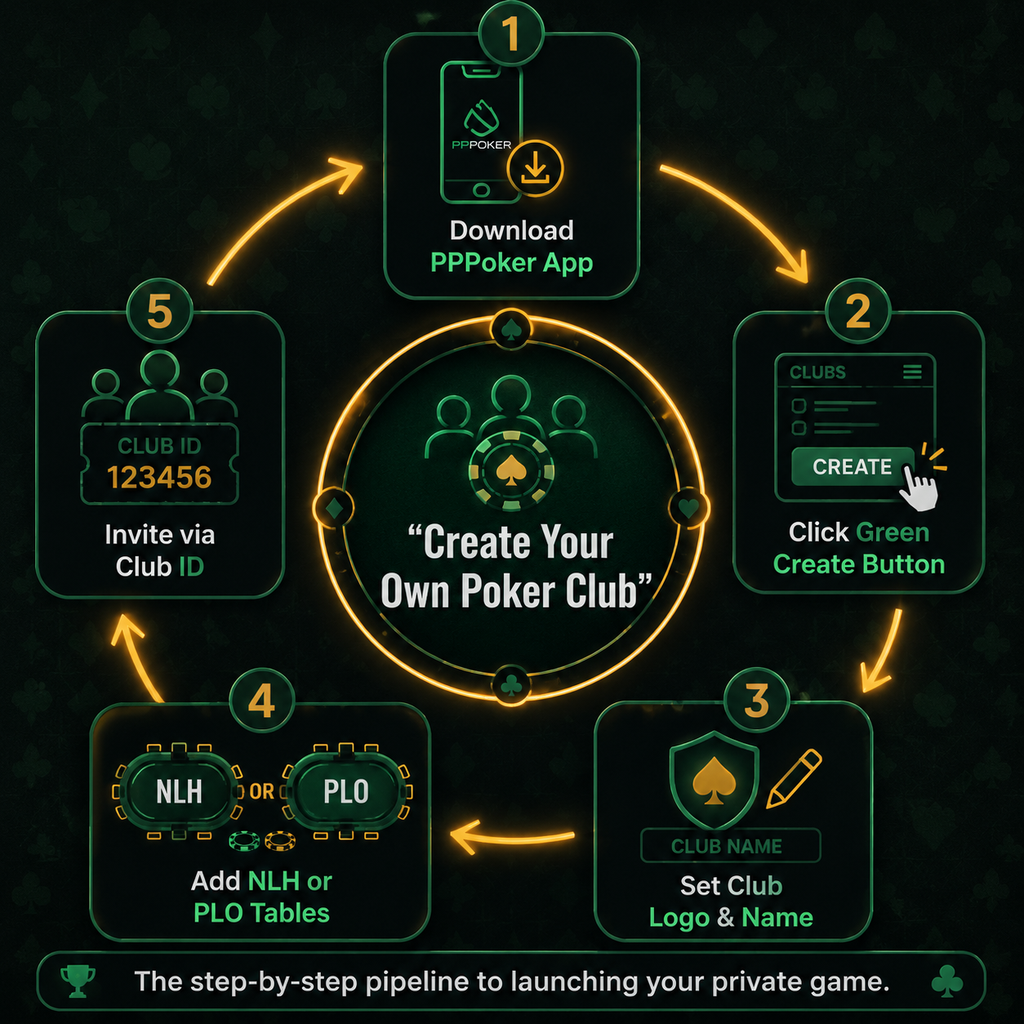
1. Download the App and Register
PPPoker is a mobile-first platform available on iOS via the App Store and Android via Google Play. If you prefer to play on a computer, PPPoker also offers a native Windows desktop client. (Historically, players used emulators like Nox Player to multi-table, but the native desktop app now handles this natively). Download the application, open it, and create a standard user account with a secure password.
2. Click the Green "Create" Button
Once you log into your PPPoker account, the process begins by clicking the green "Create" button located in the main lobby. This instantly generates your private club.
From there, click "Edit" to customize your club's branding. You will need to:
- Set Club Logo & Name: Choose an avatar that represents your group.
- Write a Description: Add essential information like contact details (Telegram or WhatsApp numbers) and general terms of play.
- Note your Club ID: This is the unique string of numbers you will send to your friends. They will enter this ID in their app to request membership to your club.
3. Understand the Chip Economy
At its core, PPPoker is a play-money app. The app itself does not process fiat currency deposits or withdrawals for club games. Instead, the real-world value of the chips is dictated entirely by a gentleman's agreement between the club owner and the players.
For example, a host in Bangkok might declare that 1 chip = 1 baht, while a host in Toronto might peg one chip to a Canadian dollar. As the club owner, you buy "Diamonds" from the app via in-app purchases, which you then convert into club chips. You hold your players' real-world funds offline (via PayPal, crypto, or cash), credit their accounts with the corresponding digital chips, and cash them out when they leave the table.
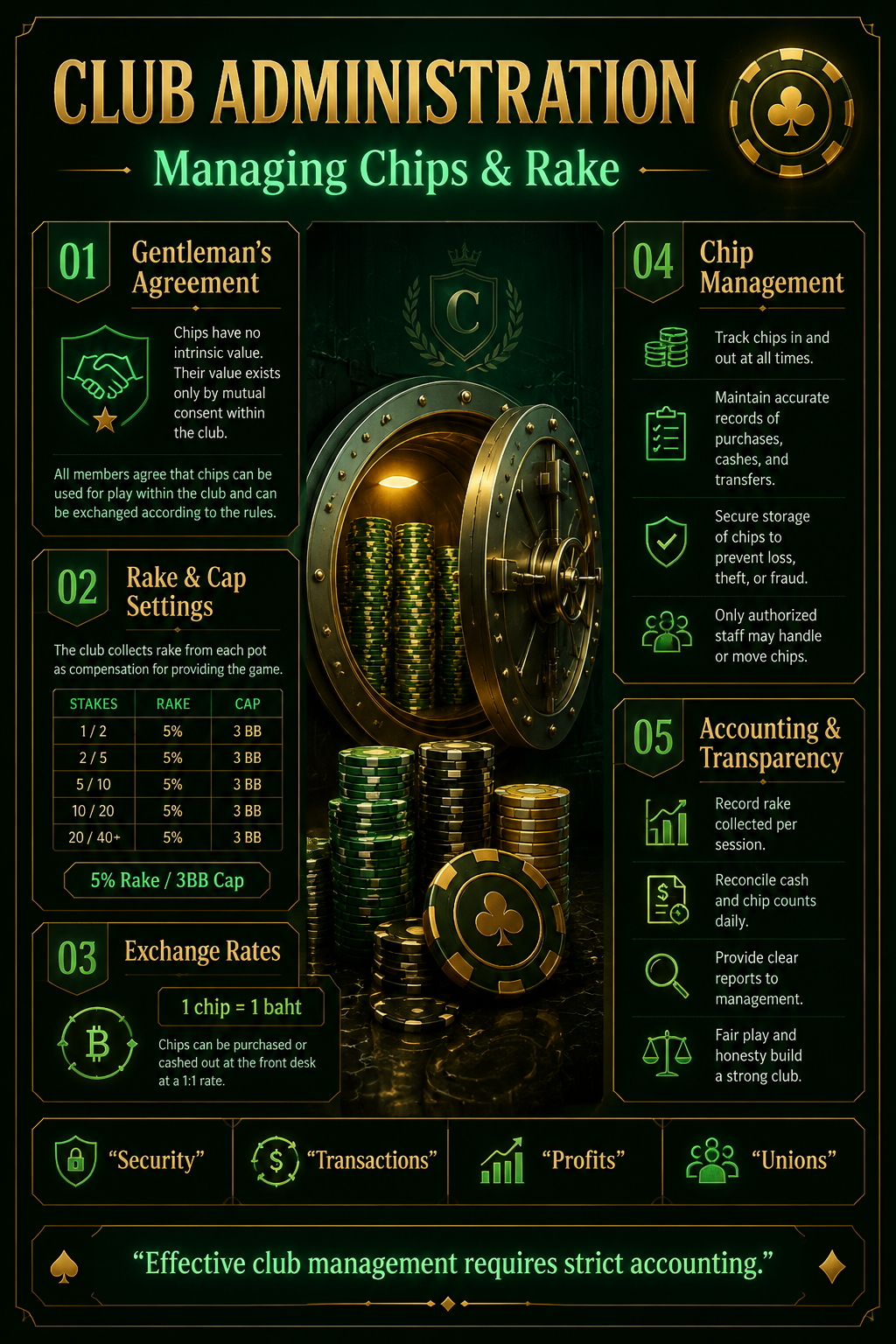
To manage the cost of buying Diamonds and running the club, hosts utilize the Rake & Cap Settings, often settling on a standard 5% Rake / 3BB Cap to keep the game sustainable.
Advanced Table Settings for Your PPPoker Home Game
With your club established and your friends accepted into the roster, you need to actually build the tables. Click the "plus" icon inside your club dashboard to add a new table.
PPPoker supports a wide variety of formats, including No-Limit Hold'em (NLH), 6+ Hold'em (Short Deck), Pot-Limit Omaha (PLO), and Open-Face Chinese (OFC).
When configuring cash games or Multi-Table Tournaments (MTTs), the host has granular control over the environment. You can choose between 2, 6, or 9 players per table. You must set the action time (typically 10 to 15 seconds) to dictate the pace of play. For high-variance action, you can toggle bomb pot features or double-board settings. Finally, you establish the minimum and maximum buy-in limits and fine-tune the rake and cap for club administration.
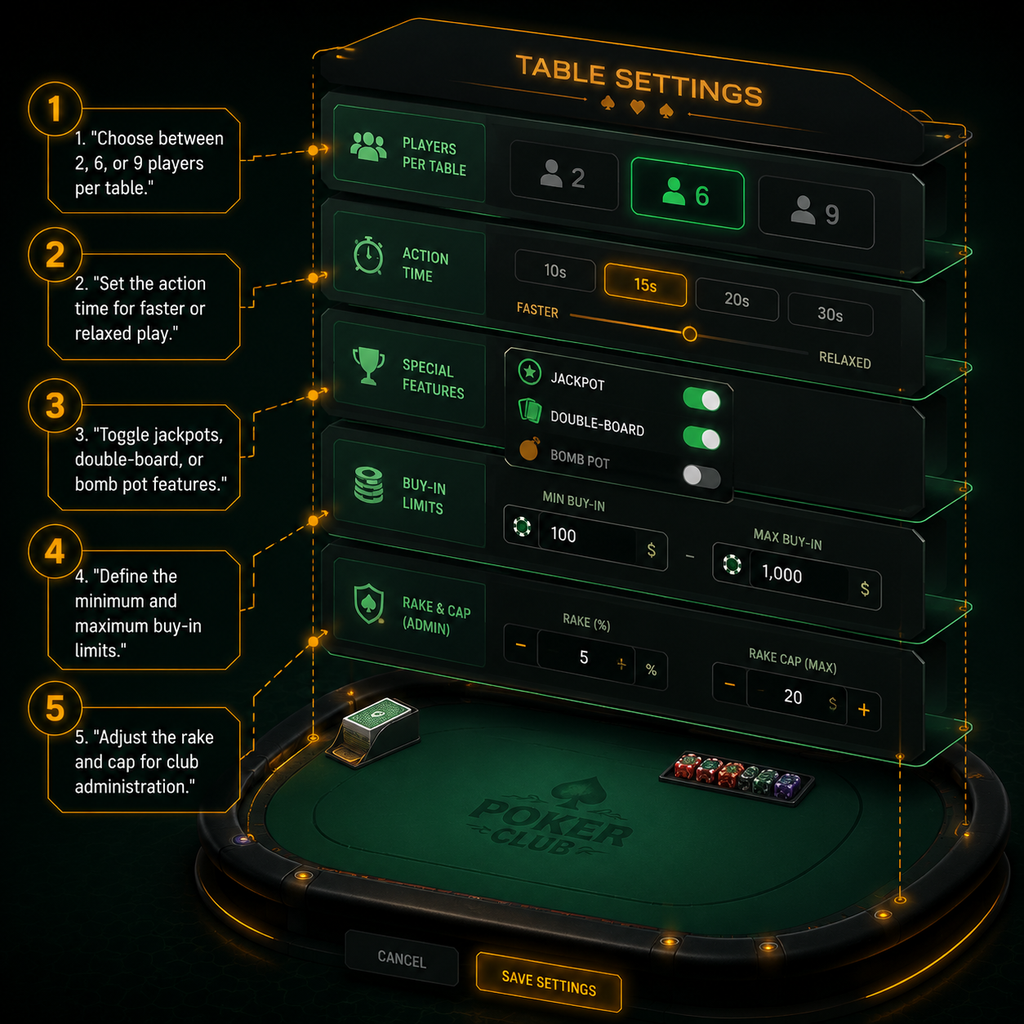
Here is a breakdown of the critical table parameters you will need to configure:
| Setting | Options Available | Editorial Recommendation |
|---|---|---|
| Table Size | 2, 6, or 9 players | 6-max is the modern standard for action-heavy home games. |
| Action Time | 10s, 12s, 15s | 12s keeps the game moving quickly without punishing mobile players on bad connections. |
| Buy-in Limits | 40BB to 400BB | 100BB minimum to 200BB maximum creates deep-stacked, strategic play. |
| Special Features | Jackpots, Bomb Pots, Run it Twice | Enable "Run it Twice" to reduce variance for your friends. Bomb pots are great for casual, splashy games. |
| Rake Structure | 1% to 5%, varying caps | If playing purely for fun with close friends, set rake to 0%. If running a serious club, 3-5% is standard. |
Securing the Game: Anti-Collusion and Integrity
Just because you are playing with friends does not mean you should ignore security. The biggest threat to any online poker game is collusion—two players sharing hole-card information to squeeze out a third.
To prevent cheating, hosts must enable the GPS/IP Restriction setting. This feature automatically stops players who are sharing the same Wi-Fi network or sitting in the exact same physical location from sitting at the same table. It completely eliminates "same household play."
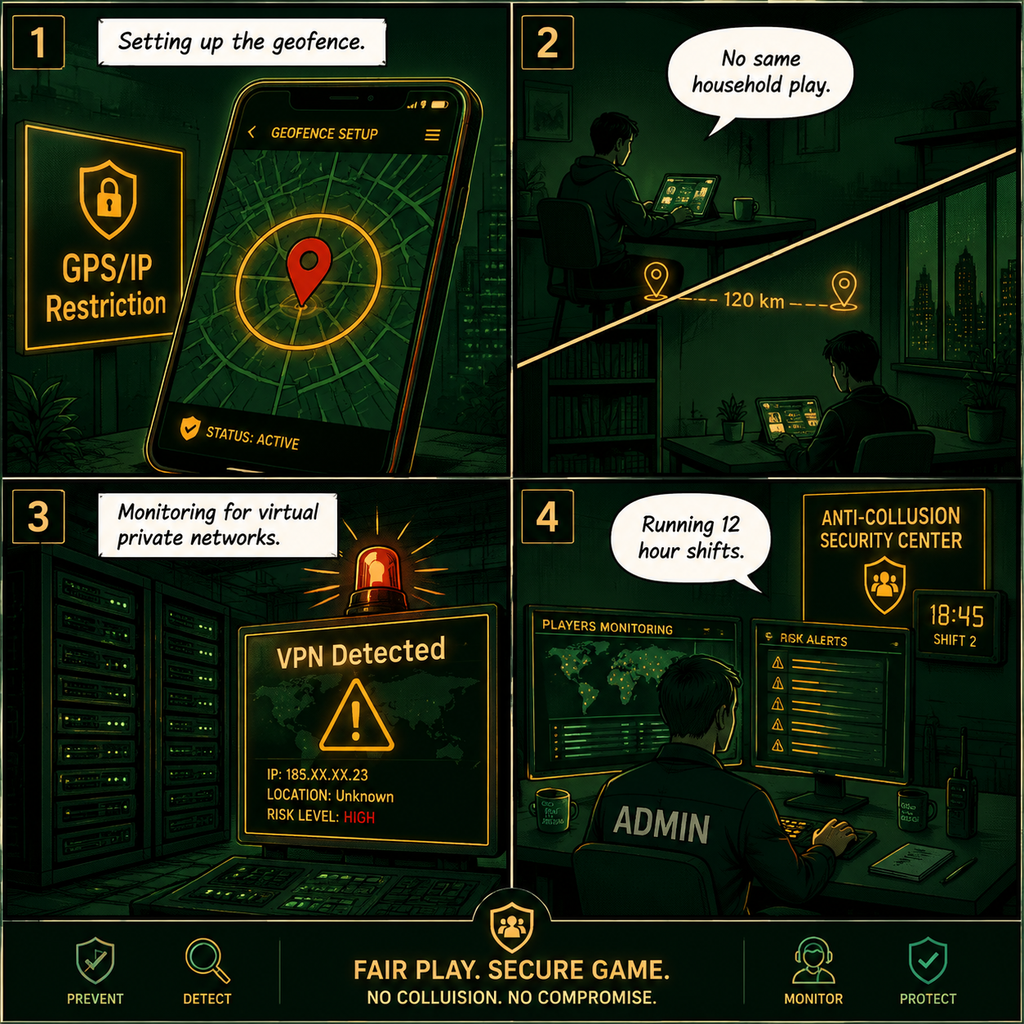
Furthermore, PPPoker's backend security teams actively monitor for players using a Virtual Private Network (VPN) to mask their location or bypass the IP restrictions. If you intend to scale your home game into a larger, public-facing club, security becomes a full-time job. Veteran club owners recommend that co-owners monitor the games by running 12 hour shifts to catch suspicious betting patterns or chip-dumping in real-time.
Scaling Up: Joining a Union
Eventually, your home game might hit a ceiling. You might have 20 friends in your club, but getting 6 of them online at the exact same time can be like herding cats. This is where "Unions" come in.
PPPoker allows independent clubs to merge their player pools into a Union. By joining a Union, your players gain access to tables hosted by other clubs around the world, ensuring there is action running 24/7. You still manage your own players' deposits and withdrawals, but they get to play against a massive global liquidity pool. While a Union is overkill for a casual Friday night game, it is the ultimate endgame for ambitious club owners.
Frequently Asked Questions on How to Set Up Home Games PPPoker
How much does it cost to create a club on PPPoker? Creating the club itself is completely free. However, granting yourself advanced administrative tools, viewing detailed player statistics, or issuing large amounts of chips requires "Diamonds," which are purchased with real money in the app store.
Can I play PPPoker on a PC? Yes. While it was originally designed purely for iOS and Android, PPPoker now has a native Windows client that makes multi-tabling significantly easier.
How do club owners cash out or make a profit? Because PPPoker uses play money, the app does not pay you. Club owners hold the real-world funds deposited by their players. If an owner decides to take a cut for hosting the game, they do so by setting a rake percentage on the tables. As hands are played, a small fraction of the digital chips are removed from the pot. The owner keeps the real-world cash equivalent of those raked chips.
Is PPPoker rigged? No. PPPoker uses a certified Random Number Generator (RNG) tested by independent auditing firms like Gaming Laboratories International (GLI). The primary risk on club apps is not the software, but the trustworthiness of the club owner holding your funds.
The Final Read
Learning how to set up Home Games PPPoker gives you the keys to your own digital casino. It strips away the geographical barriers of a traditional poker night while retaining the banter, the rivalries, and the custom rules that make private games great. Whether you are keeping it small with a 0% rake table for college buddies, or scaling up to a massive 24/7 operation, the tools are already in your pocket. Set your blinds, enforce your IP restrictions, and deal the cards.
Sources
- Worldpokerdeals: How to create your own PPPoker club?
- Somuchpoker: How to create your own online poker club on PPPoker, PokerBros or Upoker
- Cardplayer Lifestyle: PPPoker Room Review
- Reddit (r/poker): Club owners (Pokerbros, pppoker, pokerrr, Club GG), I have questions for you